You’ve probably seen those posts. Someone on Instagram claiming they built a six-figure affiliate business from their phone while sitting at Starbucks.
And you’re thinking: How To Start Affiliate Marketing Using Smartphone is this actually possible, or is it just another internet fantasy?
Here’s the truth: yes, you can do affiliate marketing from your smartphone. But it’s not the passive income dream most people sell you. It’s real work that requires strategy, consistency, and knowing which tasks actually work on mobile versus which ones will drive you crazy.
The confusion comes from two extremes. On one side, you’ve got gurus saying you need a $2,000 laptop, fancy software, and a whole tech setup. On the other side, there are people claiming you can do everything from your phone in 10 minutes a day. The reality sits somewhere in the middle, and that’s what I’m going to break down for you.
In this post, I’ll show you exactly what’s possible with smartphone affiliate marketing, what tools actually work, and where you’ll hit walls. No fluff, no hype—just the practical stuff I wish someone had told me when I started.
What Smartphone Affiliate Marketing Actually Means
Let’s get clear on what we’re talking about here.
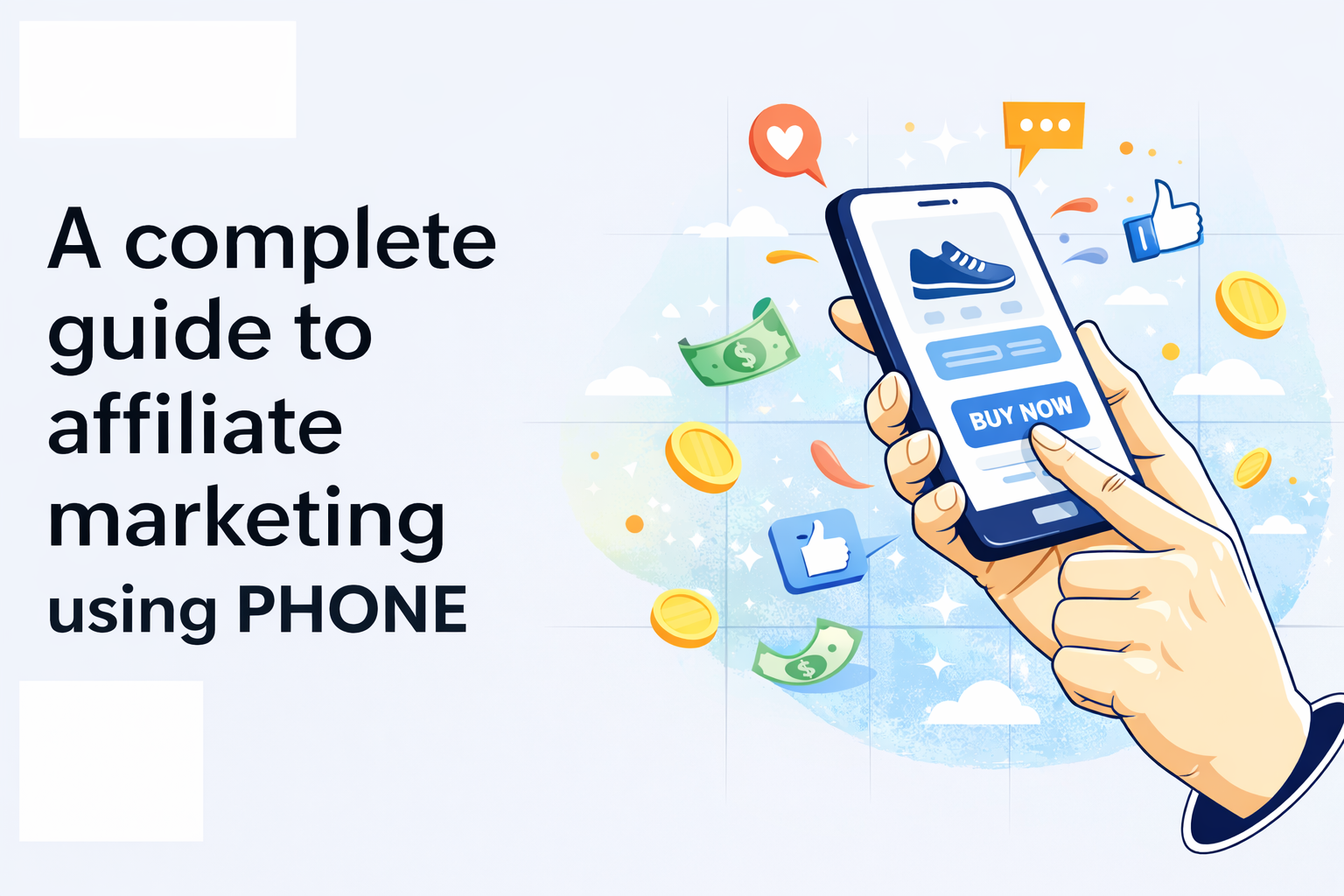
Smartphone affiliate marketing means building and running an affiliate business primarily using your phone. You’re finding products to promote, creating content, sharing affiliate links, and tracking your earnings—all from a device in your pocket.
This doesn’t mean you’ll never touch a computer. It means your phone is your main tool. Think of it like cooking—you can make great meals with just a stovetop and one pan, but sometimes you’ll want an oven. Your smartphone is that stovetop. It handles 80% of what you need.
Here’s what you can actually do from your phone:
- Create and post content on social media platforms
- Write short blog posts or product reviews using mobile apps
- Research products and compare commission rates
- Join affiliate programs and grab your links
- Respond to comments and messages from your audience
- Track clicks and sales through mobile dashboards
- Edit photos and short videos for content
- Schedule posts ahead of time using mobile apps
The key is focusing on platforms and strategies that are mobile-friendly from the start. You’re not building complex websites or running detailed analytics. You’re creating content where people already hang out on their phones.
Why Your Smartphone Might Be Better Than You Think
I’ll be honest—when I started, I thought I needed a full computer setup. Turns out, my phone had some serious advantages I didn’t expect.
Speed matters more than perfection. Your phone lets you create and post content in minutes. See something relevant to your niche while you’re out? Pull out your phone, snap a photo, write a quick caption with your affiliate link, and post it. That immediacy is hard to beat.
Your smartphone comes with built-in tools that cost money on a computer. A decent camera, video editing apps, photo filters, scheduling tools—they’re all right there. Plus, you’re creating content on the same device your audience uses to consume it. You see exactly what they see.
Think about it: Instagram, TikTok, Pinterest—these platforms were designed for mobile. You’re actually working in the environment where they perform best. Creating content on your phone isn’t a limitation; it’s often the most natural way to use these platforms.
The other thing? You can work anywhere. Waiting for an appointment? Post some content. On lunch break? Engage with your audience. Can’t sleep at 2 AM? Schedule tomorrow’s posts. This flexibility compounds over time because you’re fitting work into moments you’d otherwise waste.
The Platforms That Actually Work on Mobile
Not all affiliate marketing channels make sense for smartphone-only operation. Let me break down what works and what doesn’t.
Instagram is probably your best bet for pure mobile marketing. You can post feed content, Stories, Reels—all from your phone. Link in bio works for affiliate links, and with a business account, you can add links directly to Stories. The whole platform is built for phone use, and your audience expects mobile-quality content.
TikTok is another mobile-first winner. Short videos, trending sounds, quick hooks—you can shoot, edit, and post everything from your phone. The algorithm doesn’t care about production quality. It cares about engagement. Some of the top affiliate marketers on TikTok literally just talk into their phone camera about products they love.
Pinterest works surprisingly well on mobile. You can create pins using Canva’s mobile app, add affiliate links, and schedule posts. Pinterest users are often in buying mode, searching for product recommendations. The mobile interface makes it easy to jump between creating and engaging.
Here’s where it gets tricky:
- YouTube works but has limits (editing longer videos on a phone is painful)
- Blogging is possible but slow (typing long posts on a phone screen gets old fast)
- Email marketing works if you use the right apps (but building complex sequences is tough)
Focus on one platform at first. Master the mobile workflow for that specific platform before adding others. Trying to manage multiple channels from your phone when you’re starting out is a recipe for burnout.
Setting Up Your Mobile Affiliate Stack (The Apps You Need)
You don’t need 47 apps. You need the right five or six that work together smoothly.
For affiliate programs and link management, start with apps like Amazon Associates (if you’re in their program) or use a link shortener like Bitly or Koji. These let you create, track, and manage your affiliate links directly from your phone. Keep a notes app with all your active affiliate links organized by category.
For content creation, you’ll want Canva (mobile app is solid), CapCut or InShot for video editing, and your phone’s native camera app. Don’t overthink this. The built-in editing tools on Instagram and TikTok are often enough for basic content.
Scheduling tools are crucial if you want consistency without being glued to your phone 24/7. Later, Planoly, or Buffer all have decent mobile apps. You can batch-create content in one sitting and schedule it out for the week.
For tracking and analytics, most affiliate programs have mobile-friendly dashboards. Amazon Associates, ClickBank, ShareASale—they all let you check earnings from your phone. Install the apps for platforms you’re posting on so you can monitor engagement quickly.
More apps don’t mean more success. They just mean more time switching between screens and getting distracted.
Creating Content That Converts (Without a Computer)
Let’s talk about what content actually makes money when you’re working from your phone.
Content Formats That Work Best on Mobile:
1. Product Reviews (Your Foundation)
- Shoot a quick video showing the product in action
- Talk about why you personally like it
- Mention one specific benefit that stands out
- Drop your affiliate link in the description or bio
- Keep videos under 60 seconds for maximum engagement
- Remember: people on phones have short attention spans—you get this instinctively because you’re on your phone too
2. Comparison Posts (The Decision-Maker)
- Test multiple products in the same category
- Example format: “I tested these three yoga mats so you don’t have to”
- Show each product briefly
- Give quick pros and cons for each
- Declare a clear winner
- People love recommendations that save them research time
3. Before-and-After Content (Visual Proof)
Works especially well for:
- Skincare products
- Organization tools
- Tech gadgets
- Home improvement items
- Fitness equipment
The process:
- Take a photo before using the product
- Use the product consistently for a week (or appropriate timeframe)
- Take an after photo in the same lighting/angle
- Add a simple caption explaining the results
- Visual proof sells better than written descriptions every time
4. Story-Based Content (Trust Builder)
- Share how you discovered the product
- Explain what problem it solved for you
- Mention what surprised you about it
- Make it personal and authentic
- Use your phone’s front camera—talk like you’re FaceTiming a friend
- Authenticity builds trust faster than polished sales pitches
What DOESN’T Work Well on Mobile:
Avoid these content types when working from your phone:
- Long, detailed tutorials requiring lots of editing
- Complex side-by-side comparisons with charts and graphs
- Anything requiring extensive typing or formatting
- Multi-step processes with 10+ steps
- Content that needs precise measurements or technical specs displayed
The golden rule: Stick to content formats that play to your phone’s strengths—visual, quick, and authentic.
The Real Challenges & What NOT to Do on Your Phone
I’m not going to sugarcoat this. Smartphone affiliate marketing has real limitations. Let me break down what you’ll struggle with and what you should skip entirely.
The Biggest Challenges You’ll Actually Face
1. Typing Long-Form Content
- Writing 2,000-word blog posts on a phone keyboard is frustrating
- You’ll make more typos and spend extra time correcting them
- It takes three times longer than typing on a computer
- You can use voice typing if you are blogging or to speed up the process you can use copy paste method
2. Screen Size Limitations
Tasks that suffer on a small screen:
- Analyzing data and performance metrics
- Comparing multiple products side-by-side
- Managing spreadsheets with lots of columns
- Reviewing detailed analytics dashboards
- You can do these things, but they’re not pleasant
3. Battery Life Concerns
- Your phone becomes a critical business tool—it needs to stay charged
- Running out of battery mid-content creation is infuriating
- You’re using camera, apps, and internet constantly (drains battery fast)
- Solution: Invest in a good portable charger and keep it with you always
- Consider this a business expense, not optional
4. Clunky Affiliate Program Interfaces
- Many dashboards weren’t designed for mobile use
- Buttons are tiny and hard to tap accurately
- Navigation menus are confusing on small screens
- Loading times can be slower on mobile
- Decision point: Focus on mobile-friendly programs or deal with the frustration
5. Discipline & Distraction (The Biggest Challenge)
- Your phone contains work AND entertainment in the same device
- Instagram, TikTok, texts, games—all one tap away
- Switching between “work mode” and “fun mode” requires serious boundaries
- This isn’t a technical problem—it’s a focus problem
- You need strong self-control to stay on task
What You Should NOT Try on Your Phone
Let me save you frustration by telling you what to skip or save for computer time.
1. Building a WordPress Blog
Don’t attempt:
- Designing pages and layouts
- Installing and configuring plugins
- Fixing technical issues or broken links
- Customizing themes and CSS
- Managing backend settings
You CAN do from your phone:
- Writing basic blog posts in the WordPress app
- Publishing pre-written content
- Responding to comments
Bottom line: Set up your blog on a computer, maintain it from your phone
2. Complex Video Editing
Skip these on mobile:
- Multi-track audio mixing
- Color grading and correction
- Motion graphics and animations
- Green screen effects
- Advanced transitions
Mobile is fine for:
- Quick cuts and basic trims
- Simple text overlays
- Basic filters and effects
- Speed adjustments
The time you’ll waste fighting with mobile editing apps isn’t worth it—use a computer or pay someone
3. Email Marketing Automation
Avoid on mobile:
- Building automated email funnels
- Creating sequences with multiple branches
- Setting up complex triggers and conditions
- A/B testing campaign setups
- Designing multi-column email templates
Mobile works for:
- Sending individual emails
- Quick replies to subscribers
- Checking basic stats
- Light maintenance of existing sequences
Strategy: Set up automation on a computer, then maintain from your phone
4. Custom Graphic Design
Don’t try on mobile:
- Creating pixel-perfect custom graphics
- Designs requiring precise measurements
- Complex layouts with multiple elements
- Brand guideline-level professional work
- Anything requiring exact alignment and spacing
Mobile is perfect for:
- Using pre-made templates in Canva
- Quick social media graphics
- Simple text-on-image designs
- Basic photo editing and filters
Use templates, not custom creation
The Golden Rule for Phone Work
If a task makes you:
- Squint at the screen constantly
- Tap the same button repeatedly to get it right
- Zoom in and out over and over
- Feel frustrated within 2 minutes
→ Do it on a computer instead
Your phone is for quick, mobile-native tasks. Everything else is forcing a tool to do something it wasn’t designed for.
Quick Reference: Phone vs. Computer
| Task | Phone | Computer |
|---|---|---|
| Social media posts | ✅ Perfect | Overkill |
| Short product reviews | ✅ Perfect | Overkill |
| Long blog articles | ❌ Frustrating | ✅ Better |
| Video editing (basic) | ✅ Works | ✅ Better |
| Video editing (complex) | ❌ Skip it | ✅ Required |
| Email automation setup | ❌ Painful | ✅ Required |
| Checking analytics | ⚠️ Okay | ✅ Better |
| Custom graphics | ❌ Hard | ✅ Better |
| Template graphics | ✅ Works great | ✅ Also fine |
The key: Know your tool’s strengths and work within them, not against them.
The Truth About Income and Timelines
Let’s get real about money because this matters.
Can you make money doing affiliate marketing from your phone? Yes. Will you make thousands in your first month? Probably not.
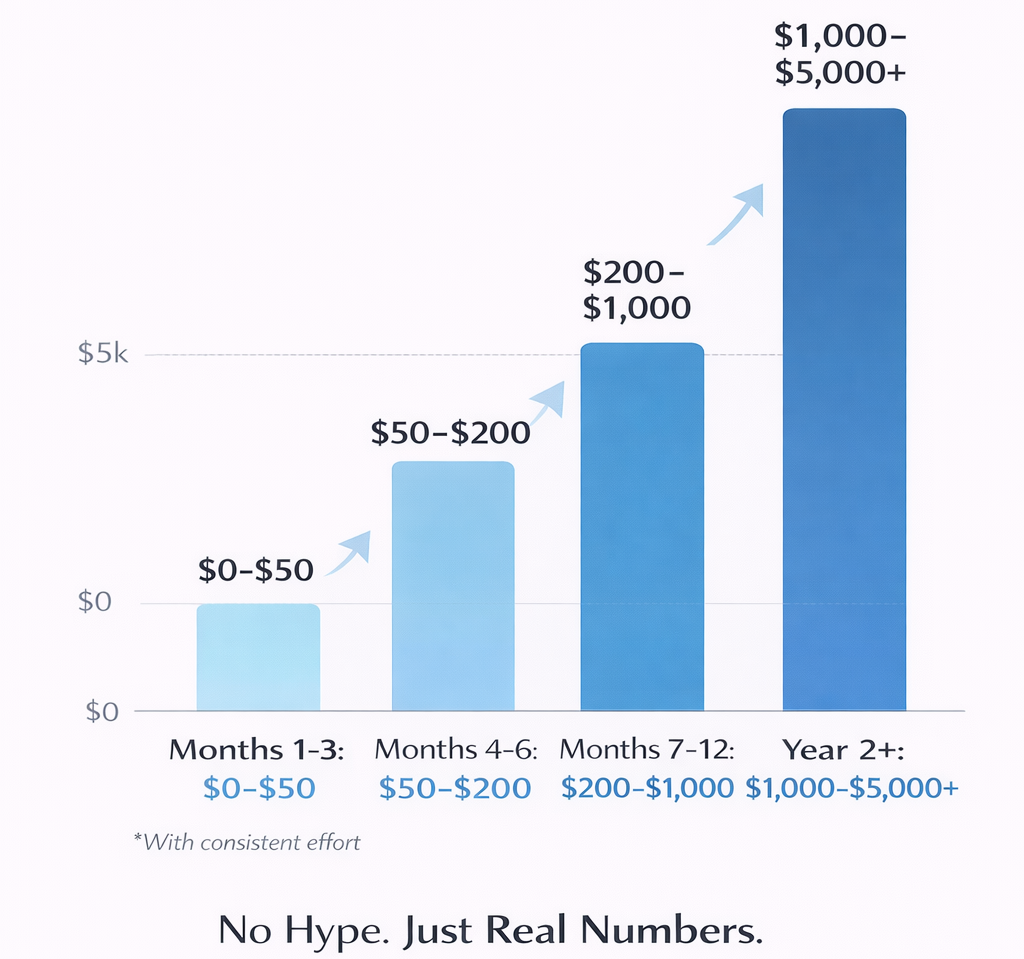
Most people see their first commission within 30-60 days if they’re posting consistently. I’m talking daily content, engaging with your audience, and actually providing value—not just spamming links.
A realistic first-year goal is $500-$2,000 per month if you’re treating this seriously and posting at least once daily. Some people make more, many make less. It depends on your niche, your audience size, and how good your recommendations are.
I made my first $50 after about six weeks of daily Instagram posts. It felt like forever, but looking back, that’s actually pretty fast. By month four, I was consistently hitting $300-400 monthly. Not life-changing, but proof the model worked.
The income is unpredictable at first. One month you make $600, the next $150. As you build a bigger audience and learn what content converts, it stabilizes. This is not a get-rich-quick thing. It’s a build-trust-over-time thing.
Frequently Asked Questions
Do I need a lot of followers to start?
No. I’ve seen accounts with 500 followers making sales because they have engaged audiences in specific niches. A thousand true fans beats a million random followers every time.
What’s the best niche for phone-only affiliate marketing?
Anything visual works well: beauty, fashion, fitness, home decor, tech gadgets. If you can show the product in photos or short videos, you’re good.
Can I do this completely for free?
Mostly, yes. Instagram, TikTok, and Pinterest are free. Some affiliate programs are free to join. You might want to invest in apps like Canva Pro for better templates, but it’s not required at first. Free version is more than enough.
How many hours per day do I need?
Start with 1-2 hours. Create content in batches, schedule it out, then spend 15-30 minutes throughout the day engaging with comments and messages.
What if I don’t want to show my face?
Plenty of successful affiliate accounts don’t show faces. Product-focused content, hands-only demos, voiceovers—there are lots of ways to stay behind the camera.
Where This Leaves You
Smartphone affiliate marketing isn’t a hack or a shortcut. It’s a legitimate way to build an income stream if you’re willing to work within its constraints.
The people who succeed with this approach are those who lean into what phones do well: quick content creation, authentic engagement, visual storytelling. They’re not trying to replicate computer-based strategies on a smaller screen.
You now know what’s possible, what tools you need, and what challenges you’ll face. The question isn’t whether it can be done—it definitely can. The question is whether you’re willing to show up consistently and create content that actually helps people.
Start with one platform. Post daily for 30 days. See what happens. You might surprise yourself.